

Generate professional visuals without a studio, photographer, or designer? It’s now just a few clicks away with generative AI image tools. Our favorite: Nano Banana 2 (a Google tool), currently one of the most accessible options available. It lets you produce studio-quality visuals: professional portraits, corporate images, and editorial scenarios. The results are often ready to use right away. Add to that greater overall consistency. Maintaining the same features, the same identity, and the same facial structure is often a real technical challenge: Nano Banana 2 tackles it with impressive stability.
Other tools exist (Grok, Sora, etc.), but Nano Banana 2 stands out for its speed, quality, and native integration into the Google ecosystem. A real advantage, though with one caveat: even if the Mountain View company denies it, it’s also the tool that’s most permissive when it comes to sharing your data.
In this article, we’ll guide you step-by-step through creating a prompt that will meet your exact needs. Rather than simply copying and pasting pre-existing templates, we’ll show you the logic behind them, giving you true autonomy. A guide best tested on Nano Banana 2, but equally usable with other tools.
As easy as “say cheese”
Access is via Gemini, Google’s conversational assistant. Select “Create an image” and choose the “Thinking” model. You can upload the original image and write the prompt to start the generation. Or create an image from scratch.
An effective prompt is an exercise in precision. Every detail directly influences the final result. If the outcome doesn’t match your initial intention, don’t hesitate to try again, make adjustments, or sometimes start over from scratch.
The first step is to define the aesthetic framework. You should specify the desired style (hyperrealistic, caricature, editorial, corporate), then describe the lighting: soft studio lighting, dramatic lighting, natural ambient light. The emotional tone completes this picture—whether serious and solemn, or, conversely, warm and playful.
Next comes the description of the subject. Age, distinctive features, expression, posture, and attire must be explicitly stated. The model must be guided with clear, prioritized instructions.
The environment is addressed in a third step: neutral or textured background, realistic or minimalist setting, sharp depth of field or artistic blur. Finally, technical specifications structure the image: shooting angle, focus, framing, aspect ratio. Together, these elements form a comprehensive visual brief.
Example of a long prompt: a selfie of Trump in Morocco
Based on a source image, a long prompt might be structured as follows:
Aesthetic framework: hyperrealistic, photographic, high-end editorial style. Natural late-afternoon lighting (golden hour), soft shadows, controlled warm-cool contrast. Emotional tone: confident, charismatic, strong and authentic presence.
Subject: Faithfully preserve the facial structure, skin tone, distinctive features, and hairstyle. No changes to facial features. Close-up portrait, head tilted slightly backward, direct gaze toward the camera. Naturally textured skin, realistic proportions. Dark, modern, and fitted outfit, with a discreet accessory.
Environment: Recognizable Moroccan setting in the background: ochre walls of a medina or indigo blue hues of Chefchaouen. Subtly blurred background, pronounced depth of field.
Technical specifications: Slightly low-angle shot, sharp focus on the irises, vertical framing with a 3:4 aspect ratio, detailed rendering, warm tones, magazine-quality.
This structure allows for precise framing of the result. See the rendering of this prompt on Nano Banana 2 and Sora in the illustration.
The relevance of short prompts
Conversely, short prompts can also yield excellent results, as recent visual models incorporate implicit aesthetic conventions. A simple example: « studio portrait, dramatic lighting, older man, serious expression » (the choice of language doesn’t matter).
The logic? When the intention is clear and based on standard visual codes, conciseness leaves the model room for interpretation. The resulting image will be consistent, but less personalized and often generic.
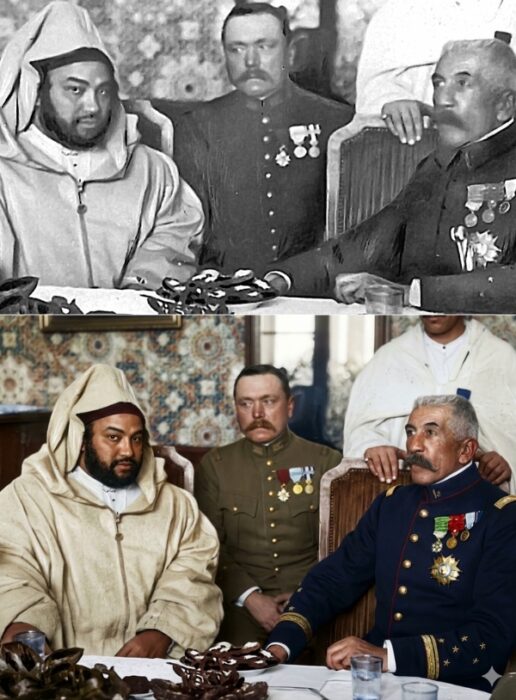
Here are a few simple instructions to copy and paste, or to use as inspiration for creating other mini-prompts: give a person expressions corresponding to a series of emojis (amused embarrassment, wink, polite smile, fit of laughter); restore an image with high photographic fidelity and enhance the resolution to 4K; generate a bird’s-eye view from an existing photo; propose a 2 × 2 grid featuring different hairstyles, etc.
These prompts illustrate the diversity of possible applications: retouching, angle variations, stylistic variations, or simulations. The only limit is your imagination—and the tokens.
Written in French by Zakaria Choukrallah; edited in English by AngloMedia group.


